
Integrate Alipay PC Web Payment with Func
A complete Alipay PC web payment example for Func: public-key mode, RSA2, optional AES content encryption, trusted orders, verified notifications, and idempotent updates.
Integrate Alipay PC web payment with Creght Func: create a trusted server-side order, sign with RSA2, optionally encrypt content with AES, and update payment state idempotently from verified asynchronous notifications.
Scope and prerequisites
Pricing must come from a server-side product catalog; the browser sends only productId. Payment success comes only from a verified asynchronous notification, never from browser return parameters.
Prepare Alipay values and configure environment variables
1. Get the values from Alipay Open Platform
- Sign in to Alipay Open Platform and open the application that will receive payments. Record its
APPIDfrom the application details. - Open Development Settings → Development Information → Interface Signing Method. Use the Alipay developer tools to generate an RSA2 application key pair. Keep the application private key yourself and upload only the application public key. After configuration, copy the Alipay public key from the same area.
- For content encryption, open Interface Content Encryption and view or generate the AES key. It is a Base64 string with a different purpose from the RSA keys.
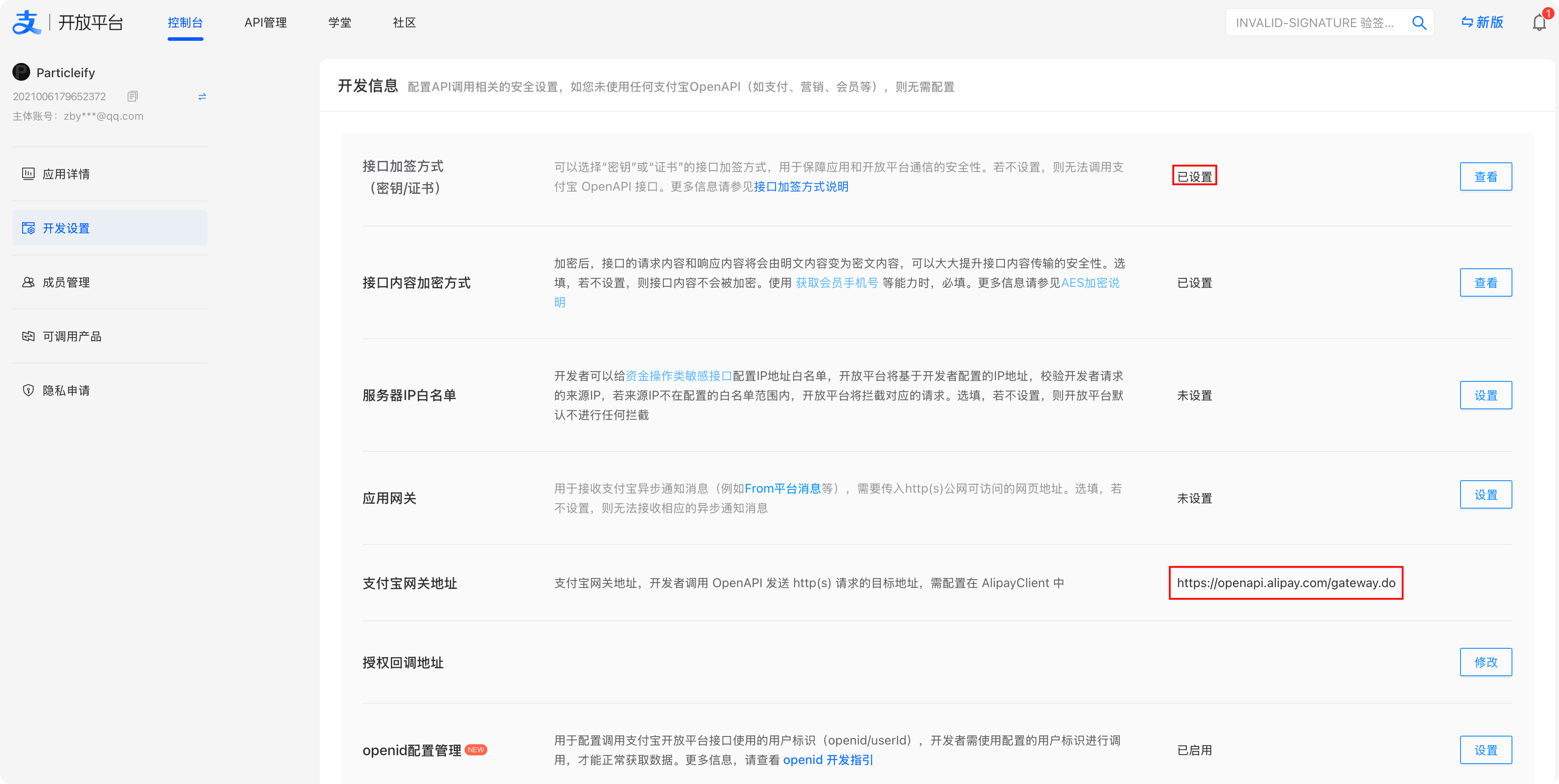
Do not confuse keys and endpoints: you generate the application private key for request signing; you upload the application public key to Alipay; Alipay provides the Alipay public key for response and notification verification. The Alipay Gateway URL shown here is the target used by Func for OpenAPI requests. The payment notification and post-payment return URLs are not configured on this page; pass them with each
alipay.trade.page.payrequest asnotify_urlandreturn_url.
2. Map them to Creght environment variables
| Creght key | Value source | Required |
|---|---|---|
ALIPAY_APP_ID | The APPID in the Alipay application details | Yes |
ALIPAY_PRIVATE_KEY | The application private key you generated and retained; not the application public key | Yes |
ALIPAY_PUBLIC_KEY | The Alipay public key provided after you upload the application public key | Yes |
ALIPAY_AES_KEY | The Base64 AES key under Interface Content Encryption | When AES is enabled |
ALIPAY_SELLER_ID | The receiving account's Alipay user ID (PID), matching seller_id in notifications | Yes |
ALIPAY_NOTIFY_URL | A stable, published HTTPS Func endpoint, such as https://example.com/func/alipay.notify | Yes |
ALIPAY_RETURN_URL | The site page used after payment; it is only a UX destination | Optional |
ALIPAY_GATEWAY | Omit it for the default production gateway; set the matching sandbox gateway for sandbox use | Optional for sandbox |
3. Add them in Creght Backend / Env
- Open the target site editor and select Backend → Environment Variables.
- Select New variable and add each row from the table separately. The key must match exactly; paste the complete corresponding value.
- Keep secrets only in environment variables and read them in Func through names such as
process.env.ALIPAY_PRIVATE_KEY. Never put them in pages, Func source, CMS content, logs, or browser responses.
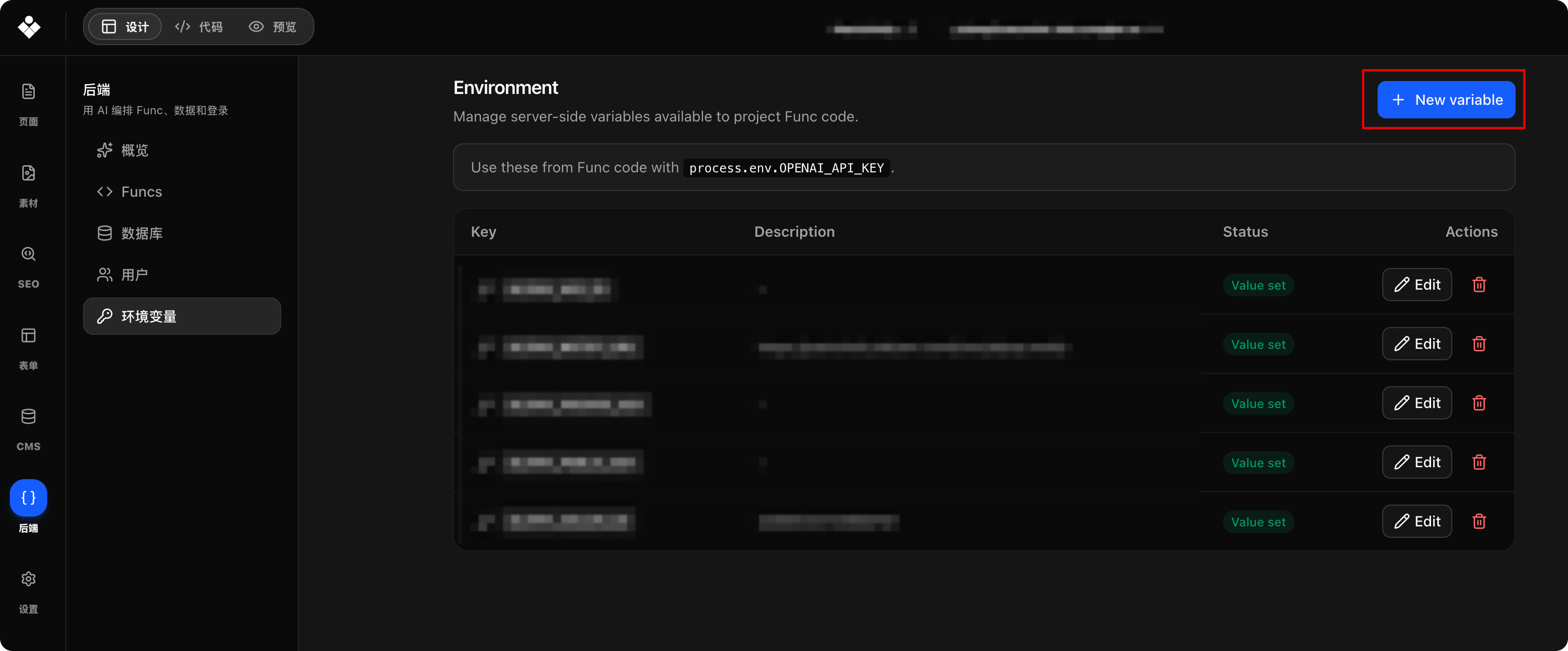
The environment page should expose only variable names and the Value set status. Never expose a private key or AES key in screenshots, errors, logs, or support requests. After rotating a key, update both Alipay and Creght and revalidate the matching sandbox or production environment.
4. Where AES applies
Alipay uses AES/CBC/PKCS5Padding with a 16-byte zero IV. In Func this maps to native Web Crypto AES-CBC, whose compatible PKCS#7 padding is automatic; do not pad manually. Configuring an AES key in Alipay does not force every call to use encryption. Only when ALIPAY_AES_KEY is present does this example explicitly encrypt UTF-8 biz_content, set encrypt_type=AES, and then RSA2-sign the complete parameters containing the ciphertext. See Alipay content encryption.
Do not AES-decrypt the asynchronous notification: the standard
alipay.trade.page.paynotification remains form parameters that must be verified with RSA2 under Alipay's canonicalization rules. Decrypt only a field that a product-specific document explicitly marks as encrypted, never the entire notification body.
Order table
Create /platform/table/payment_orders.json:
{
  "name": "Payment orders",
  "desc": "Alipay order state",
  "json_schema": {
    "type": "object",
    "properties": {
      "userId": { "type": "string" },
      "productId": { "type": "string" },
      "subject": { "type": "string" },
      "amount": { "type": "string" },
      "outTradeNo": { "type": "string" },
      "status": {
        "type": "string",
        "enum": ["pending", "paid", "closed"]
      },
      "alipayTradeNo": { "type": "string" },
      "paidAt": { "type": "string" }
    },
    "required": [
      "userId", "productId", "subject", "amount", "outTradeNo", "status"
    ]
  }
}
Func implementation
Create /backend/func/alipay.ts:
import type { TalizenFuncContext } from 'talizen/func-runtime'

type OrderRow = {
  id: string
  userId: string
  productId: string
  subject: string
  amount: string
  outTradeNo: string
  status: 'pending' | 'paid' | 'closed'
  alipayTradeNo?: string
  paidAt?: string
}

const TABLE = 'payment_orders'
const PRODUCTS = {
  starter: { subject: 'Starter plan', amount: '9.90' },
} as const

function env(name: string): string {
  const value = process.env[name]
  if (!value) throw new Error(name + ' is required')
  return value
}

function binaryStringToBytes(value: string): Uint8Array {
  const bytes: number[] = []
  for (let i = 0; i < value.length; i++) bytes.push(value.charCodeAt(i))
  return new Uint8Array(bytes)
}

function pemBytes(value: string): Uint8Array {
  const base64 = value
    .replace(/-----BEGIN [^-]+-----/g, '')
    .replace(/-----END [^-]+-----/g, '')
    .replace(/\s+/g, '')
  if (!base64) throw new Error('RSA key is empty')
  return binaryStringToBytes(atob(base64))
}

function bytesToBase64(value: ArrayBuffer): string {
  let binary = ''
  for (const byte of new Uint8Array(value)) binary += String.fromCharCode(byte)
  return btoa(binary)
}

function base64ToBytes(value: string): Uint8Array {
  return binaryStringToBytes(atob(value))
}

async function encryptAES(content: string): Promise<string> {
  const keyBytes = base64ToBytes(env('ALIPAY_AES_KEY'))
  if (![16, 24, 32].includes(keyBytes.length)) throw new Error('invalid AES key')
  const key = await crypto.subtle.importKey(
    'raw',
    keyBytes,
    { name: 'AES-CBC' },
    false,
    ['encrypt'],
  )
  const encrypted = await crypto.subtle.encrypt(
    { name: 'AES-CBC', iv: new Uint8Array(16) },
    key,
    new TextEncoder().encode(content),
  )
  return bytesToBase64(encrypted)
}

async function decryptAES(content: string): Promise<string> {
  const keyBytes = base64ToBytes(env('ALIPAY_AES_KEY'))
  if (![16, 24, 32].includes(keyBytes.length)) throw new Error('invalid AES key')
  const key = await crypto.subtle.importKey(
    'raw',
    keyBytes,
    { name: 'AES-CBC' },
    false,
    ['decrypt'],
  )
  const decrypted = await crypto.subtle.decrypt(
    { name: 'AES-CBC', iv: new Uint8Array(16) },
    key,
    base64ToBytes(content),
  )
  return new TextDecoder().decode(decrypted)
}

function decodeFormPart(value: string): string {
  return decodeURIComponent(value.replace(/\+/g, ' '))
}

function parseForm(raw: string): Array<[string, string]> {
  if (!raw) return []
  return raw.split('&').map((part) => {
    const separator = part.indexOf('=')
    const key = separator < 0 ? part : part.slice(0, separator)
    const value = separator < 0 ? '' : part.slice(separator + 1)
    return [decodeFormPart(key), decodeFormPart(value)]
  })
}

function formValue(pairs: Array<[string, string]>, name: string): string {
  const pair = pairs.find(([key]) => key === name)
  return pair ? pair[1] : ''
}

function canonicalPairs(
  pairs: Array<[string, string]>,
  ignored: string[] = [],
): string {
  const ignoredSet = new Set(ignored)
  return pairs
    .filter(([key]) => !ignoredSet.has(key))
    .map(([key, value]) => key + '=' + value)
    .sort()
    .join('&')
}

function canonicalParams(params: Record<string, string>): string {
  return Object.keys(params)
    .map((key) => key + '=' + params[key])
    .sort()
    .join('&')
}

function queryString(params: Record<string, string>): string {
  return Object.keys(params)
    .sort()
    .map((key) => encodeURIComponent(key) + '=' + encodeURIComponent(params[key]))
    .join('&')
}

function chinaTimestamp(): string {
  const china = new Date(Date.now() + 8 * 60 * 60 * 1000)
  return china.toISOString().slice(0, 19).replace('T', ' ')
}

function normalizeAmount(value: string): string {
  const match = /^(\d+)(?:\.(\d{1,2}))?$/.exec(String(value).trim())
  if (!match) throw new Error('invalid amount')
  const integer = match[1].replace(/^0+(?=\d)/, '')
  return integer + '.' + (match[2] || '').padEnd(2, '0')
}

async function signRSA2(content: string): Promise<string> {
  const key = await crypto.subtle.importKey(
    'pkcs8',
    pemBytes(env('ALIPAY_PRIVATE_KEY')),
    { name: 'RSASSA-PKCS1-v1_5', hash: 'SHA-256' },
    false,
    ['sign'],
  )
  const signature = await crypto.subtle.sign(
    'RSASSA-PKCS1-v1_5',
    key,
    new TextEncoder().encode(content),
  )
  return bytesToBase64(signature)
}

async function verifyRSA2(content: string, signature: string): Promise<boolean> {
  const key = await crypto.subtle.importKey(
    'spki',
    pemBytes(env('ALIPAY_PUBLIC_KEY')),
    { name: 'RSASSA-PKCS1-v1_5', hash: 'SHA-256' },
    false,
    ['verify'],
  )
  return crypto.subtle.verify(
    'RSASSA-PKCS1-v1_5',
    key,
    base64ToBytes(signature),
    new TextEncoder().encode(content),
  )
}

export async function create(
  input: { productId?: string },
  ctx: TalizenFuncContext,
) {
  const user = ctx.auth.requireUser()
  const productId = String(input.productId || '') as keyof typeof PRODUCTS
  const product = PRODUCTS[productId]
  if (!product) throw new Error('invalid product')

  const outTradeNo = 'C' + crypto.randomUUID().replace(/-/g, '')
  const params: Record<string, string> = {
    app_id: env('ALIPAY_APP_ID'),
    method: 'alipay.trade.page.pay',
    format: 'JSON',
    charset: 'utf-8',
    sign_type: 'RSA2',
    timestamp: chinaTimestamp(),
    version: '1.0',
    notify_url: env('ALIPAY_NOTIFY_URL'),
  }
  const bizContent = JSON.stringify({
    out_trade_no: outTradeNo,
    product_code: 'FAST_INSTANT_TRADE_PAY',
    subject: product.subject,
    total_amount: product.amount,
  })
  if (process.env.ALIPAY_AES_KEY) {
    params.encrypt_type = 'AES'
    params.biz_content = await encryptAES(bizContent)
  } else {
    params.biz_content = bizContent
  }
  if (process.env.ALIPAY_RETURN_URL) {
    params.return_url = process.env.ALIPAY_RETURN_URL
  }
  params.sign = await signRSA2(canonicalParams(params))

  ctx.db.insert(TABLE, {
    userId: String(user.id),
    productId,
    subject: product.subject,
    amount: product.amount,
    outTradeNo,
    status: 'pending',
  })

  const gateway = process.env.ALIPAY_GATEWAY || 'https://openapi.alipay.com/gateway.do'
  return { outTradeNo, payUrl: gateway + '?' + queryString(params) }
}

export async function notify(_input: unknown, ctx: TalizenFuncContext) {
  const failure = (reason: string, status = 400) => {
    console.warn('alipay notify rejected:', reason)
    return new Response('failure', { status })
  }

  try {
    const pairs = parseForm(await ctx.request.text())
    const signature = formValue(pairs, 'sign')
    if (!signature || formValue(pairs, 'sign_type') !== 'RSA2') {
      return failure('invalid sign fields')
    }

    const content = canonicalPairs(pairs, ['sign', 'sign_type', 'alipay_cert_sn'])
    if (!(await verifyRSA2(content, signature))) {
      return failure('signature verification failed')
    }
    if (formValue(pairs, 'app_id') !== env('ALIPAY_APP_ID')) {
      return failure('app_id mismatch')
    }
    if (formValue(pairs, 'seller_id') !== env('ALIPAY_SELLER_ID')) {
      return failure('seller_id mismatch')
    }

    const outTradeNo = formValue(pairs, 'out_trade_no')
    const tradeNo = formValue(pairs, 'trade_no')
    const tradeStatus = formValue(pairs, 'trade_status')
    const totalAmount = formValue(pairs, 'total_amount')
    if (!outTradeNo || !tradeNo || !totalAmount) {
      return failure('required trade fields are missing')
    }

    const result = ctx.db.query<OrderRow>(TABLE, {
      where: { outTradeNo },
      limit: 1,
    })
    const order = result.list[0]
    if (!order) return failure('local order not found')
    if (normalizeAmount(order.amount) !== normalizeAmount(totalAmount)) {
      return failure('amount mismatch')
    }

    if (order.status === 'paid') {
      if (order.alipayTradeNo && order.alipayTradeNo !== tradeNo) {
        return failure('trade_no mismatch')
      }
      return new Response('success')
    }

    if (tradeStatus === 'TRADE_CLOSED') {
      ctx.db.update(TABLE, order.id, { status: 'closed' })
      return new Response('success')
    }
    if (tradeStatus !== 'TRADE_SUCCESS' && tradeStatus !== 'TRADE_FINISHED') {
      return new Response('success')
    }

    ctx.db.update(TABLE, order.id, {
      status: 'paid',
      alipayTradeNo: tradeNo,
      paidAt: new Date().toISOString(),
    })
    return new Response('success')
  } catch (error) {
    console.error('alipay notify failed:', error)
    return new Response('failure', { status: 500 })
  }
}
Start payment in the browser
Start payment in the browser:
import { invoke } from 'talizen/func'

const { payUrl } = await invoke<{ payUrl: string }>(
  'alipay.create',
  { productId: 'starter' },
)
window.location.assign(payUrl)
Acceptance and security boundaries
- AES encrypts only OpenAPI
biz_content; it does not replace RSA2. Continue verifying asynchronous notification form data with RSA2, and do not treat the entire notification body as AES ciphertext. For another OpenAPI's encrypted response, verify the exact response node required by Alipay before passing its ciphertext todecryptAES(). return_urlis UX only and must never mark an order paid. Payment truth comes from a successfully verified asynchronous notification.- Verify RSA2 first, then check
app_id,seller_id, the local order, amount, and Alipay trade number. Duplicate notifications return the samesuccess. - The example performs only an idempotent order-state update. Entitlement fulfillment must also be idempotent on
outTradeNo/tradeNo. - Sandbox and production use separate apps, keys, and gateways. Validate one real notification in the matching Alipay environment before launch.